- Manages your content.
- · Integrates with your existing IT portfolio.
- · Supports intelligent decision-making enterprise-wide.
- · Grants the IT Department central control over standards, security and auditing.
- · Gives individual departments flexibility to customize their filing structures, views and workflows.
Wednesday, March 28, 2012
The Laserfiche Solution Exchange: A One-Stop Shop for User Knowledge
Wednesday, February 29, 2012
Tech Tip: Scheduling Workflows

By combining comprehensive ECM functionality with powerful business process management, enterprise content management is able to provide an infrastructure that:
- · Manages your content.
- · Integrates with your existing IT portfolio.
- · Supports intelligent decision-making enterprise-wide.
- · Grants the IT Department central control over standards, security and auditing.
- · Gives individual departments flexibility to customize their filing structures, views and workflows.
The new schedule starting rules are highly customizable, allowing you to run workflows at whatever times make sense for your business processes.
In Workflow 8.3, you can now run workflows on a schedule, which means your workflows no longer need a starting event to run, giving you more flexibility when automating your business processes. The new schedule starting rules are highly customizable, allowing you to run workflows at whatever times make sense for your business processes. You can create schedules that run only certain months of the year, that run only on certain weeks or days, or that repeat throughout the day.
Monthly
If you select to have your workflow repeat monthly, you can choose which months you want the workflow to run (every month or only certain months), and you can select which day of the month you want to the workflow to run. When setting the day, you can set a calendar date, such as the fifteenth of each month, or a relative day, such as the last Friday of the month.
Weekly
With the weekly option, you can choose which day or days of the week you want your workflow to run. You can also specify if you want the workflow to run every week or every few weeks.
Daily
Workflows can be set to run on a daily schedule. For example, you can have a workflow run every day, every weekday, or every few days.
Hourly
Once you set a monthly, weekly or daily schedule, you can configure the schedule so that the workflow will repeat every few hours or minutes.
Example: The city of Bedrock processes a large number of building permits. It wants to make the processed permits available to the public as quickly as possible while keeping its records updated. Instead of using Workflow to update its Website and sync with its database every time a permit is processed, it is more efficient if the city can upload and sync several permits at once. The city creates a scheduled workflow to run once an hour, Monday through Friday. The workflow copies the metadata from all the permits in the Processed folder and inserts that information into a database. The workflow also moves the permits into a folder that is publically accessible with WebLink.
Tuesday, February 14, 2012
Enterprise Content Management – Tools and Strategies.
Laserfiche, running since 1987, has been using its Run Smarter philosophy to create simple and elegant solutions for content management. With a client list of more than 30000 organizations worldwide that includes federal, state, local government agencies and Fortune 1000 companies, Laserfiche has been catering their need of software for streamlining documents, records and business process management. Enterprise Content Management (ECM) refers to the strategies, methods and tools that are used to capture, manage, store, preserve and deliver content documents related to organizational needs. ECM tools and strategies may allow managing an organization’s unstructured information.
Keeping the organization’s needs in mind, Laserfiche has released Laserfiche 8.3, a content management tool. The product spans across various business verticals and helps organizations to improve information management and automated transaction processes such as accounts payable, case management, contract management and human resources.
Laserfiche 8.3 has included new features such as
1. New Workflow. New Workflow may improve the productivity of enterprise content management by automating transactional processes as the workflow activities need to be dragged and dropped on a graphical canvas.
2. Database. This feature automates the information retrieval and updating process from third-party databases by simple integration.
3. PDF. It enables the Laserfiche administrators to add immediate value to product suite and import PDF forms into Laserfiche automatically. It also enables to retrieve information from PDF files and map them as per Laserfiche fields.
4. More than 60 in-built Workflow. This enterprise content management feature makes it easier to customize the product’s configuration to the needs of an organization and business vertical.
5. Digital signatures. In Laserfiche 8.3, the digital signatures are validated with the signing certificates on the server. Digital signatures may also prompt Workflow activities in guiding documents by approval process.
6. Web Administration Console. Web Administration Console in enterprise content management (ECM) enables an administrator to access the functions from anywhere, such as remote sites, client computers and mobile devices. In short, it makes the administration flexible.
Tuesday, January 10, 2012
Laserfiche 8.3 Takes Transactional Content Management to New Level

New software release delivers immediate value to customers’ lines of business
Delivering on its commitment to help customers grow the value of their enterprise content management (ECM) investment, Laserfiche today announced the immediate availability of Laserfiche 8.3. The new release spans various lines of business, helping organizations improve information governance and automate transactional processes such as accounts payable processing, case management, contract management and HR onboarding, among others.
“We are committed to providing product enhancements that improve the way organizations do business. Over the past year, our customers have begun automating more and more complex business processes, and we developed Laserfiche 8.3 to respond to their needs,” said Tom Wayman, Vice President of Product Strategy at Laserfiche.
Laserfiche 8.3 includes the following new and enhanced features:
New Workflow activities that improve productivity. With enterprise content management, organizations quickly automate transactional processes by dragging and dropping pre-built workflow activities onto a graphical canvas.
Database activities automate the process of retrieving and updating information from third-party databases, simplifying integration.
PDF activities add immediate value to the product suite by enabling Laserfiche administrators to automatically import PDF forms into Laserfiche, retrieve information from PDF fields and map them to Laserfiche fields.
More than 60 built-in workflow activities make it easier than ever to customize workflow configuration to the unique needs of each organization and line of business.
Digital signatures that simplify information governance. Digital signatures in Laserfiche 8.3 are validated with signing certificates on the server, so users know that a signature is trustworthy. Digital signatures can also prompt Workflow activities that guide documents through the approval process.
A new Web Administration Console that improves deployment flexibility. Laserfiche 8.3 offers an easy way for administrators to securely access the administrative functions of the repository from anywhere—including remote sites, client computers and even mobile devices—making administration more flexible than ever.
“The advanced business process management capabilities and administration tools in Laserfiche 8.3 enable organizations of all sizes to rapidly implement a wide variety of transactional content management solutions,” said Wayman. “Laserfiche 8.3 is an infrastructure deployment that enables our customers to use Enterprise Content Management as a foundation for delivering shared services across the enterprise.”
Monday, December 5, 2011
Laserfiche Reveals the ROI of Content Management Software at Schwab IMPACT
RIA firms can save between $48,000 and $362,000 in annual operational costs with ECM
SAN FRANCISCO, CA (Laserfiche)—November 1, 2011—Laserfiche (booth #335) today announced the availability of a white paper that explores the return on investment for RIA firms that leverage enterprise content management (ECM) software. Calculations are based on benchmark data from recent industry studies prepared by Nexus Strategy, Moss Adams, and the 2011 InvestmentNews RIA Technology Study.
“With Laserfiche’s 25-year history and experience with over 30,000 installations worldwide, we were able to conservatively approximate the savings associated with using Enterprise Content Solutions to ‘go paperless’ and automate document-related processes,” said Tim Welsh, CFP, Senior Consultant at Laserfiche. “In total, firms that use ECM can increase profitability by 64.1% to 125.6%.”
Table 1: Summary of Staff and Cost Savings by Firm Size
| Firm Size | Emerging ($500,000 in annual revenue) | Established ($1,000,000 in annual revenue) | Enterprise ($4,000,000 in annual revenue) |
| Technology Investment | 1.4% of revenues ($7,000) | 2% of revenues ($20,000) | 1% of revenues ($40,000) |
| Staff Savings | 1,000 hours (0.4 of a full-time employee) | 1,500 hours (0.6 of a full-time employee) | 11,000 hours (4.4 full-time employees) |
| Overhead Savings | 9.7% of revenues ($48,000) | 9.2% of revenues ($92,000) | 9.0% of revenues ($362,000) |
| Profit Increase | 125.6% | 74.8% | 64.1% |
| Business Value Increase | $242,000 | $644,000 | $3,616,000 |
In particular, firms that embrace ECM realize five major benefits:
· Reduced paper storage costs.
· Automation of back-office processes for increased efficiency.
· Integration with CRM software for increased productivity.
· Simplified compliance.
· Increased business valuation.
“For a relatively small investment in ECM software, RIAs can make a powerful improvement in today’s income as well as tomorrow’s long-term business value,” said Welsh.
The paper, “ROI for RIAs,” is available for free at the Laserfiche booth (#335) and Website.
About Laserfiche
Since 1987, Laserfiche® has used its Run Smarter® philosophy to create simple and elegant enterprise content management (ECM) solutions. More than 30,000 organizations worldwide—including federal, state and local government agencies and Fortune 1000 companies—use Laserfiche software to streamline document, records and business process management.
Tuesday, November 1, 2011
Tech Tip: Saved Column Profiles in Laserfiche 8.3
When working in the ECM Laserfiche Client, users can customize the columns displayed for them within a particular folder in the repository in order to display exactly the information they need in that folder.
For example, a user who frequently looks up customer information in the repository might configure a set of columns to display customer-related fields so that they can quickly scan for the correct documents, whereas an administrator who handles page generation, text generation and indexing tasks might want to display information such as the number of pages and whether they have been OCRed and indexed. In enterprise content management, Laserfiche 8, both users can configure the columns exactly as they want them, and both users can also configure different column displays for different folders to allow them to perform different tasks.
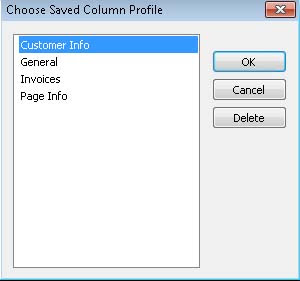
Laserfiche 8.3 introduces a new feature to make working with column displays even easier: saved column profiles, which allow users to save their column layout and quickly apply it to a folder later. For example, a user who frequently looks up customer information might create a “Customer Info” column profile, which displays the “Customer Name,” “Company Name” and “Customer ID” fields. They could then quickly select this column profile for each relevant folder, rather than recreating the desired column layout by hand.
This feature also allows users to quickly switch between column profiles. One user might need to both review customer information and administer page and text generation, sometimes in the same folders. That user could create profiles for “Customer Info” and “Page Info,” and then load each one as needed to quickly switch the column information that is displayed for the folder.
Saved column profiles provide a fast, straightforward and flexible way to specify which columns should be displayed, save them for later use, and switch between them when working in the repository.
Note: This tip is a preview of a feature that will be available with Laserfiche 8.3. Please note that feature details may change between now and the release date.